How can hotels use social media during a crisis response?


Photo credit: Mark Emery Photography via Foter.com / CC BY-NC-ND

The majority of hotels recognize the critical need for crisis response planning. But have they factored in social media? Over at Hotel Executive, Gary explains eight ways hotels can be effectively using social media during a crisis response.


7 ways to get the most out of social media at conferences

Summer is conference season, and we all know preparing for a conference is an important part of the experience. Social media has become a powerful tool for connecting with people at conferences, driving traffic to your booth and letting your audiences at home know what you’re learning. Below are some simple tips for being social media-ready at a conference or event.


Scott Beale / Foter / CC BY-NC-ND

Plan ahead. Ensure you have a designated tweeter while you’re attending. If several employees from your company are attending, don’t duplicate efforts and post the same content. Be sure you know the basics before attending: booth number, hashtag, speakers info., etc.

Consider bringing a portable charger for your phone. Outlets can be scarce at conferences and posting on social media all day will suck your battery dry. Most importantly, post ahead of the conference. Let others know you’ll be there.

Use the appropriate hashtag. Be sure to use the correct hashtag while tweeting. We’ve seen companies use two or three different hashtags while attending a conference. This can be very confusing and you may lose credibility.

Post photos and videos. I cannot stress enough how important it is to post visual content while you’re there. People want to see what’s happening. Photos also appear more prominently on the feed and you may have a better chance of being retweeted. What should you take photos of? Include photos of employees, your booth, speakers, etc. Keep it professional. If you’re heading to a bar after, it’s probably best not to include that shot (literally!).

Engage. Retweet interesting posts, mention speakers Twitter handles in your tweets, etc.
Include names. Mention who is at your booth and include name(s) and title(s). Double check to make sure the spelling is correct.

Drive traffic to your booth. Give attendees a reason to stop by your booth. Offer prizes (gift cards, iPads, etc.) or promote a new product.

Don’t disappear when it’s over. Just because it is over doesn’t mean you need to vanish. Discuss your favorite session or speaker, what you’re looking forward to next year, etc.

Before your next conference, you’ll be fully prepared. Enjoy conference season and happy tweeting!

Photo credit: Scott Beale / Source / CC BY-NC-ND

Six steps to launching a new social media account

You’ve decided it’s time to create a new social media account for your company, but you’re not exactly sure where you should start. Whether you’re thinking about creating a LinkedIn Company Page, Twitter account, Instagram account or Facebook Page, you need to think about several factors before you dive in. Here are a few things to consider before you create a new social media account and push out your first message.

Identify your audience. Identify your target audience and determine who you want to reach. Most importantly, is your target audience on the platform you’re considering creating?

Spy on your competition. See if your competition is on the particular platform you’re interested in creating. If they are on a given platform, see who your competition is connecting with on that particular platform. Look at the different types of content they’re sharing. See what’s working well for your competition and what is not working as well. What types of content have the highest engagement?


Foter / CC BY-SA

Identify the content you’ll share. Ask yourself why people would want to follow you. What do you have to offer?  Give them a reason to follow you by positioning yourself as the expert in your given industry. If you’re in the insurance industry, consider sharing tips, industry news, original visual content (such as infographics and photos from conferences), etc.

Frequency. Ask yourself if you and your team are able to devote enough time to another platform. How much time do you have to tweet/post on the new platform? Don’t set expectations too high, meaning, don’t plan to tweet three times a day, if you only have time to tweet a few times a week.

Ensure voice/tone is consistent. Be sure there’s a designated person tweeting and not several. This will ensure your tone is consistent throughout. Make sure your tone is appropriate for the industry you’re reaching out to.

Determine your end-goal and be realistic. Are you looking to increase traffic to your website? Consider sharing company news, blogs and other pages on your domain. Maybe you’re looking to create overall awareness for your company. Share company news while sprinkling in relevant industry news that will pertain to your audience.

Don’t try to tackle too many goals at once. Stick to a few until you’ve perfected your approach and go from there.

Those are just a few things to consider before you jump into creating a new social media account. Have anything to add? Comment below.

Photo credit: Foter / CC BY-SA

How to integrate social media in crisis communications


ePublicist / Foter / CC BY-ND

A crisis is a time of uncertainty that requires the careful management of information. If you don’t move quickly to present the facts and explain your position, then others will do it for you – and that puts the accuracy of the words and images they use beyond your control.

The words and images you use can either spell success and strengthen your future or damage your company’s reputation for years to come. The impact of social media on the crisis communications process has been significant.

Today information flows faster is more complex and independent. It is spread through multiple channels, and as a result, is often less reliable and more difficult to control. You often have just a few hours or minutes to communicate.

Social media must be fully integrated in your crisis communications plan. That means, your social networks are of equal import as other audiences and your community manager should be an effective communicator, as well as a media-savvy professional with appropriate technical skills.

Messaging must be also consistent with other channels, but appropriate for social networks. Candor is expected and an authentic voice is critical.  And, as crisis communications is a two-way process, listening through your social networks can inform your communications with many different audiences.

Above all, you need to consider and plan for all contingencies. Each type of crisis should be considered. Social media will play a critical role in communicating during and after natural disasters, terrorist attacks, cyber breaches and, of course, crises created by social media. But also consider its role in financial crises, human resources issues and (in the insurance world) claims and service issues.

Join me on Thursday, Feb. 12, 2015 at 11 a.m. EST for the IMCA webcast, “Integrating Social Media in Crisis Communications,” where I’ll explore these issues in more detail.

Hotel reputation management in the age of the instant review

Yelp, TripAdvisor, Hotels.com… The web has given travelers have so many ways to evaluate, select, book and review hotels. How do hotels manage their reputations proactively and honestly?


Hotels must actively manage their online reputations.
Unique Hotels Group / Foter / CC BY-SA 2.0

Our president Gary Kimball has some advice, which he shares with Hotel Business Review:

Hotels should look at how they are allocating their precious marketing and public relations dollars. This means comparing the value of social media buzz to advertising and print and broadcast media coverage. A review in a popular blog or traditional media like The New York Times or Travel + Leisure can do wonders in building awareness. But those readers may still seek online reviews before making decisions.

Read more at HotelExecutive.com.

Are Automated Posts the Best Solution for Your Social Media Efforts?

Many companies and the marketing and communications agencies that represent them use social media management tools such as SproutSocial, Hootsuite or Radian6 to manage their social media accounts.

Many social media professionals love the scheduling features of these tools. Often scheduling tweets and Facebook posts in advance is done to save time, but is this having a negative effect on your engagement?


keiyac / Foter / Creative Commons Attribution 2.0 Generic (CC BY 2.0)

1. Don’t be a robot. If your company’s tweets are posted everyday at 10 am, noon and 2 pm, followers will notice that. It will seem like you are simply tweeting three times a day because that’s what you’re expected to do, not because you have genuinely useful or relevant information to share. Also, it seems robotic, like a real person didn’t take the time to craft the tweet him or herself.

2. Interaction goes both ways. If your posts are all scheduled, you will be missing opportunities to interact with your followers. Say someone asks a question on Facebook. Ideally you would respond to their question in a timely fashion. One way to be sure you catch notifications quickly is to have your social media management tool up in the background of your computer, so that while still working on other projects, you can occasionally check to make sure you haven’t missed anything.

3. Stay up to date on the news. If your posts for the day are all already scheduled, you may not be taking into account breaking news and events that come up that affect your industry or company. When these things happen it is important that you respond as soon as possible, so as not to get lost in the crowd. Simply taking a half hour during the day to go through your news feed as well as search the news for any relevant industry updates, is a great way to share or retweet the timely news your audience wants to know.

There is absolutely a place for scheduling automated posts, such as if you want to share company news or a link to your newest blog post. However, scheduled posts have to be mixed with live posts in order to most effectively communicate with your audience.

Socially Irresponsible

Some small business owners don’t believe in using experts for social media engagement and content development. They see the practice as novel and unproven – until it isn’t.

Such is the case of The Union Street Guest House in Hudson, N.Y. This picturesque small town inn quickly discovered the demonstrative impact of social media when comments about a fines-for-reviews policy hit the inn’s Facebook page and Yelp, the popular online review site.

According to an ABC News story resulting from the social media dust-up, the inn claims its “policy” was posted to its website as a tongue-in-cheek response to a wedding from years ago and should have been taken down. The policy in essence stated bridal parties would be fined $500, taken from deposit monies, for each negative review the inn might receive connected to a particular wedding or event.

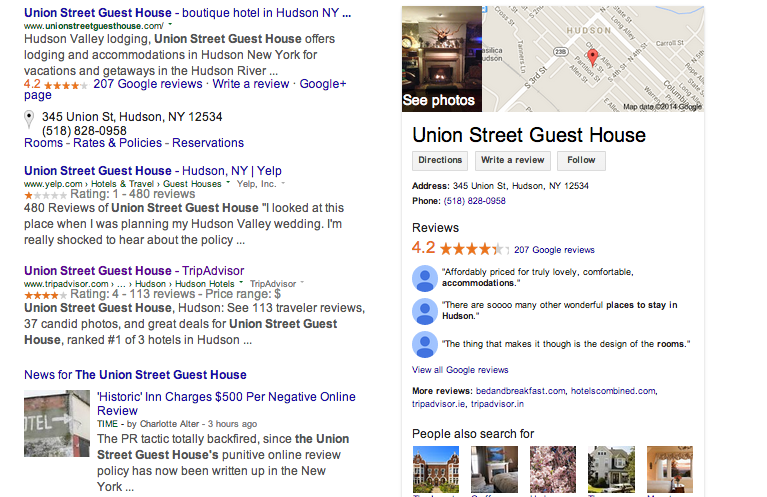
A Google search for the inn's name brings with it a wealth of negative online content that will impact the business' bottom line.

A Google search for the inn’s name brings with it a wealth of negative online content that will impact the business’ bottom line.

Unfortunately, a simple Google search of the inn’s name now produces both a link to the inn’s website, as well as countless social media and news articles referencing this not-so-amusing policy.

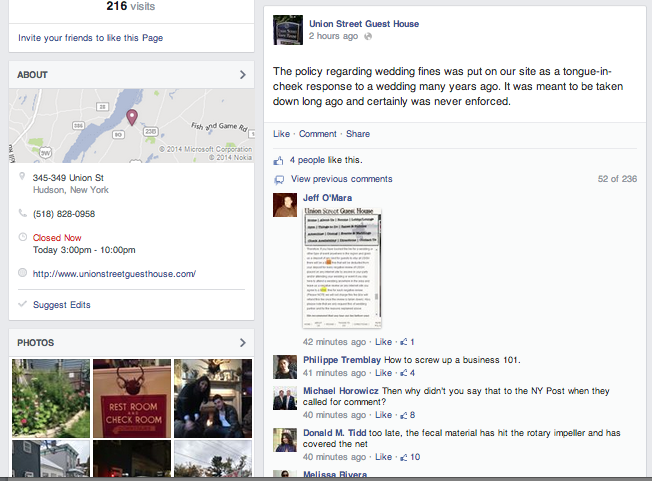
The result is a Search Engine Optimization nightmare for the inn coupled with a runaway train of negative comments on its Facebook page (more than 200 at this writing; although it appears the inn may now be deleting posts from its Facebook page).

Since this firestorm hit mainstream media, the inn's Facebook page has been inundated with negative posts.

Since this firestorm hit mainstream media, the inn’s Facebook page has been inundated with negative posts.

The news coverage and social media firestorm – with only a half-hearted response from management that appears to have since been deleted  – have created a massive public relations problem to overcome. This isn’t the type of crisis you wait out. And without a strategy for responding to and recovering from this communications nightmare, The Union Street Guest House is likely to see a steep decline in business, assuming it has the wherewithal to survive at all.

Small businesses are successful because they do what they do well. Where they often fail is when they try to do something outside of their expertise.

By consulting with a social media professional or brand content specialist, small businesses can avoid errors – even tongue-in-cheek responses – that might not seem substantial at the time, but with an extra set of trained eyes, can be seen for the potential disasters they are and thus avoided. Alternatively, bringing in the professionals after a crisis has erupted is not optimal, but it can mean the difference between staying in business or going under.

Most freelancers or public relations agencies can find equitable arrangements with small businesses that won’t break the bank, and can avoid or attempt to correct business-ending mistakes.

For a free consultation on how working with a public relations agency can help protect and promote your business, please contact me at rhughes@kimballpr.com.

Consistency Matters on the Social Web

When it comes to managing social media platforms, consistency matters. From the content that is shared to the voice/tone, being consistent is vital. Below we explore a few ways to keep everything in sync.


mkhmarketing / Foter / Creative Commons Attribution 2.0 Generic (CC BY 2.0)

A few things to consider …

  • Frequency matters. Ensure content is shared regularly on platforms. Posting four to five times a week? Stick with that posting schedule that disperses your posts evenly across the week. Avoid disappearing on platforms for an extended period of time.
  • Avoid randomness. Stick with content related to the industry or your brand identity. It can be confusing when seemingly random content is shared especially if someone is visiting the page for the first time.
  • Voice consistency matters. Be sure the voice and tone is similar when posting, responding or engaging with others especially if a few people manage the account. This helps establish a friendly rapport.
  • Keep the company name consistent. Avoid confusion and stick with the same company name. For example, decide whether or not your will use your company or brand’s full name or acronym.
  • Keep the logos uniform across all platforms. If you have different versions of your logo, ensure you are using the same one across social accounts. This helps people find and recognize you across platforms.

Feel free to share any additional tips in the comments!

Photo credit: mkhmarketing / Foter / Creative Commons Attribution 2.0 Generic (CC BY 2.0)

Responding to Consumers on Social Media

It’s vital to respond to posts, tweets, questions, etc., on social media, but there’s a right way to handle responding. It’s important to be present for your customers. You certainly do not want to be a ghost on your social media accounts. Below, we explore the right versus wrong ways to respond.

ivanpw / Foter / CC BY
  1. Wrong: Do not acknowledge a mistake a customer brings to your attention via social media. Right: No matter how small the mistake, always acknowledge a mistake and apologize promptly.
  2. Wrong: Listen but don’t respond. Being a ghost and not responding to customers is not a good reflection on your company/brand. Right: It’s important to respond to both positive and negative posts.
  3. Wrong: Respond to everyone with a generic message so everything is consistent. Right: Craft responses that can be personalized to handle different types of comments.
  4. Wrong: If there’s an issue, don’t ask for personal information such as an email address or phone number when responding. Right: Ask the customer to email you (be sure to provide an email address that will go directly to you and not a generic email response center). This also ensures the conversation will be handled privately and not online.
  5. Wrong: Take your time to respond to followers. Right: Ensure someone at your company responds to posts in a timely manner and directs the posts to the appropriate person if there’s a question or issue.

Social media managers, do you have any additional tips to share? Comment below.

Photo credit: ivanpw / Foter / CC BY

Why it’s a bad idea to link Facebook and Twitter posts

I sometimes cringe when I see Facebook and Twitter posts/accounts linked. Linking accounts automatically posts the same content from one account directly to another account. My initial thought when I see a Facebook account linked to a Twitter account or vice versa is a robot is running the account. I fear no one is listening to their customers on a given platform if the two are linked.

Brands may think it makes sense to link these accounts for a few different reasons. Someone running the account simply may not realize he/she should not be linking the accounts. Brands may think it saves a significant amount of time and cuts out a step.

Though it may save brands a minute or two, it may hurt the business in the long run. Yet, some companies still link their posts. Below, I’ll discuss why it make sense not to connect Facebook and Twitter accounts.

striatic / Foter.com / CC BY

Here are a few reasons not to link Facebook and Twitter posts/accounts:

  • Linking accounts gives brands a robotic feel. It can make it seem like brands are not listening.
  • Less clicks may occur when posts are the same across networks.
  • It lacks personality. It’s like a machine is just spewing out information and tweets instead of a human.
  • There’s no conversation/engagement when Facebook is linked to Twitter. Brands could be engaging with other accounts and mentioning Twitter handles.
  • Often people pause when they see accounts linked and may be less likely to visit a page.

If time is an issue, which it is for most, take advantage of a social media management platform. This will allow brands to login to one account to manage multiple social media networks. This way businesses won’t have to login to Facebook and Twitter separately. We like HootSuite and SproutSocial for managing our accounts.

Photo credit: striatic / Foter.com / CC BY